


Tuesday, May 4, 2010
My Month With The iPad
Posted by Jeff Campbell in "Apple iPhone, iPod Touch, iPad" @ 06:00 AM
Business Time
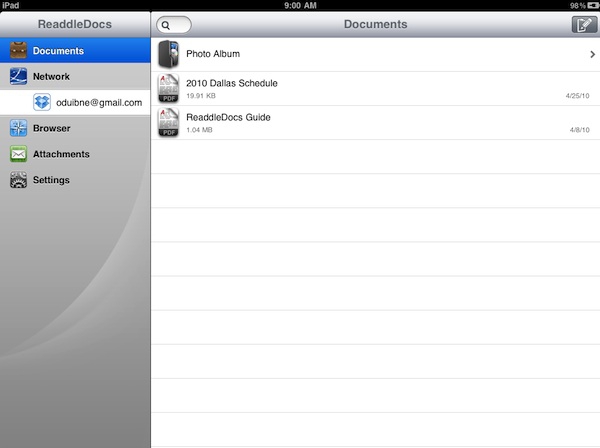
Figure 12: ReaddleDocs, a file management tool for your iPad.
Admittedly, this isn't why I purchased the iPad, but I have experimented a bit with some options in the business genre. Evernote is one option, since it integrates seamlessly with your current Evernote account so you can view documents, articles and more as long as you have an internet connection. Another option to consider, if you want to manipulate and store files and documents on your iPad, is ReaddleDocs. They make several iPhone products such as ScannerPro and ReaddleDocs (our review of ScannerPro is here, and the ReaddleDocs review is here), and now they have a version of ReaddleDocs for the iPad. It works very well for documents on the iPad and I'll be doing a Quick Look on that later in the week in case you are interested. You can use iTunes to transfer documents and files, or just email them to yourself and open them up on the iPad. ReaddleDocs takes care of the rest.
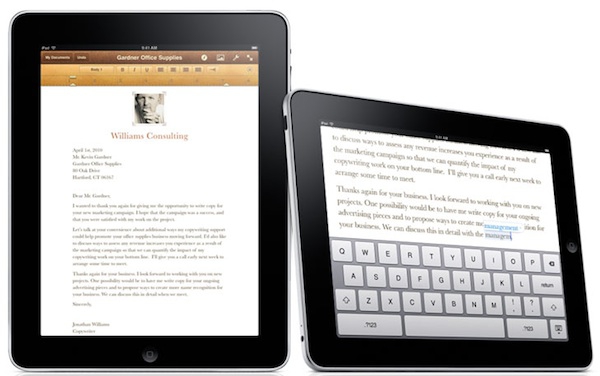
Figure 13: Pages for the iPad, a great option for document creation.
Another option is Apple's Pages for the iPad, and at $9.99 USD it is quite a bargain in my book. Pages is something that I have used to compose some documents (certainly not enough to give it a thorough review) and found that it is pretty good for what I need on the iPad. I think it is definitely something to consider if you are interested in using your iPad to compose any kind of document, or for that matter you need to be able to read Word documents or PDFs. Using the File Sharing in iTunes you can easily transfer documents back and forth. Along with this Apple product you might consider Keynote and Numbers, two other programs from Apple for the iPad, both $9.99 USD each. I haven't tried them but they go hand in hand with Pages.
As a free alternative to Pages, if your needs are simple (pun intended), you might want to give SimpleNote a shot. It is for the iPhone as well as the iPad, and all your notes sync up to the web site. All you have to do is register your free account to keep all your notes sync'd between your devices. It also works as a simple document creator.
The problem I have with all of these is that you cannot print from the iPad, at least directly. One solution is to use Air Sharing HD for the iPad. This is a $9.99 USD app but it will allow you to use the printer sharing feature with OS X. The problem with this is it is Mac only so Windows users are out of luck, at least for now. One app that does work with Windows machines is called PrintCentral, they have a $9.99 USD iPad only app, a $9.99 USD iPhone/iPod Touch app, as well as a $12.99 USD iPhone/iPad/iPod Touch compatible app. Whew. They wanted to cover their bases with that one. I'm sure there are other options, but these are the ones that I'm familiar with at this point.
Accessories, Yes There Are A Few
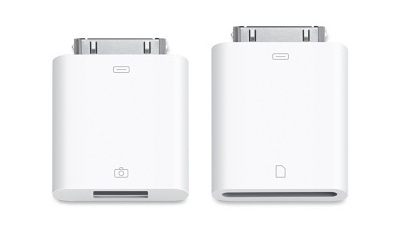
Figure 14: The Apple iPad Camera Connection Kit, one of the must have accessories for the iPad.
The Apple Store has some accessories for the iPad, about 6 or 7 that you will find useful. Among them is the Camera Connection Kit listed for $29.00 USD. This works very well from what I've read (the iLounge also has an in-depth review of this kit) to transfer photos and videos to your iPad. It comes with two connectors, one for SD cards and one for USB connection. What is nice is that you can connect a card reader or a keyboard or mic to the USB connector and they work with the iPad. It will allow you to use the iPad as a viewer and backup drive for the photos. And Lightroom reads it as another drive once you have it hooked up to your laptop or desktop. So if you use Lightroom and have stored some photos on your iPad, you can connect it, and Lightroom will read from the iPad as if it were a storage device. So when traveling or out in the field, you have another storage option if you need it, not to mention a viewing device for the photos you have on your camera.
The only accessory I have purchased is the Apple iPad Case (listed for $39.00 USD). I use it to hold the iPad when I want to use it as a digital photo frame at home, for example, and it offers nice protection and usability when I'm packing my iPad around. Of course there are many other options for cases, including some nice ones from WaterField Designs. There is also a new site called iPad Case Finder that does the searching for you. And screen protectors for the iPad have made their debut as well. For me, after using some of screen protectors on the iPhone, I like having that extra layer of protection even if it is a glass screen. For the iPad with it's larger screen, it is something that I'm considering as well. If you have kids, this might be a good option if you let them use it. Strange things happen to devices once kids get their hands on them!
Conclusion
Do you want a device that can function, within limits, much the same as a laptop with "instant on" capability, that can serve you up your Internet viewing as well as video, lets you check your email and that works great as an eBook reader including magazines and newspapers? I did, and for me, the iPad suites me perfectly. Is it the right device for you? Only you can answer that question, but for me it does what I need it to do. Don't get me wrong, this certainly doesn't replace my laptop, but it has certainly found a place in between my iPhone and MacBook, just like Steve said it would.
Jeff Campbell is a fan of all things Apple, an X-boxer (the 360 kind) and geek. He works as a floor supervisor in a 911 center in the Portland, OR area, and lives in a small town just north of Mt. Hood with his wife, two kids, two dogs, a snake and a tarantula. Oh, and a three legged cat named "Tres."

Do you enjoy using new hardware, software and accessories, then sharing your experience with others? Then join us on the Thoughts Media Review Team! We're looking for individuals who find it fun to test new gear and give their honest opinions about the experience. It's a volunteer role with some great perks. Interested? Then click here for more information.