Apple Thoughts - News & Reviews on all things Apple

Be sure to register in our forums and post your comments - we want to hear from you!


Android Thoughts

Loading feed...

Laptop Thoughts

Loading feed...

Digital Home Thoughts

Loading feed...


All posts tagged "icon"


Friday, September 24, 2010

The Perfect Bed for the Fanboy

Posted by Jeff Campbell in "Apple iPhone, iPod Touch, iPad" @ 03:00 AM

http://gizmodo.com/5645315/the-most.../full+(Gizmodo)

"'HOLLANDIA LAUNCHES WORLD'S FIRST BED DESIGNED TO WORK WITH IPAD' screams the press release. And much like Kanye's tweets or Mike from the Jersey Shore, I can't quite figure out if I'm laughing at them or with them."

This is about lifestyle choices. And I choose not to spend $20,000.00 USD on a bed like this. It is very cool looking, but not that cool. However, in the spirit of keeping our dear readers informed as to what is available to them, I posted it anyway.
Monday, March 15, 2010

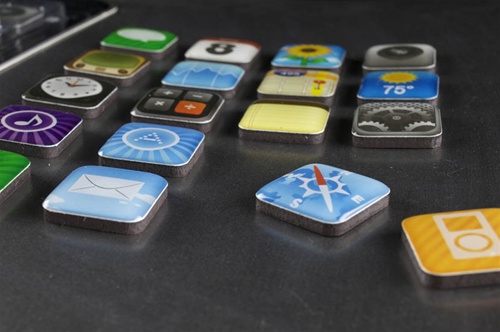
iPhone Icons Turned Into Fridge Magnets

Posted by Jeff Campbell in "Apple iPhone & iPod Touch" @ 09:00 AM

http://www.mobilecrunch.com/2010/03...fridge-magnets/

"Take a break from reading our hard-hitting news coverage and take a look at these cute little things. Perfect stocking stuffer (I know, a little early) for your favorite app developer and/or iPhone fanatic. What with these things, those Android pillows, and all the other tech knickknacks I've been seeing, it seems that pretty soon they're going to need a whole online store just to hold all of them."

Never too early for gifts right? You can get them ordered at Jailbreak Toys, and the set of 18 icons runs $12.99 USD.


Tuesday, January 19, 2010

Jawbone Icon Headset With an iPhone Bonus

Posted by Jeff Campbell in "Apple iPhone & iPod Touch" @ 10:00 AM

http://appadvice.com/appnn/2010/01/...phone-friendly/

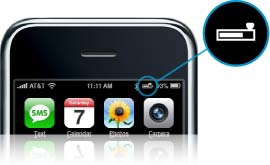
"A quick note to inform you that Aliph has just released a new version of its premium Jawbone Bluetooth headset. Besides its top of the line design and an integrated new chip that allows it to make your voice sound creepy, the Jawbone Icon comes with an interesting new feature for iPhone owners."

I wish all the headsets did this, the one thing about the Apple headset that I miss (hated the headset itself, never fit correctly). I like the "Hero" version of the Jawbone Icon, but I can't see myself wearing the gold "Bombshell" version though can you? Ok, don't answer that...


Thursday, September 17, 2009

Attention to Detail by Apple

Posted by Jeff Campbell in "Apple Software (OS X)" @ 11:00 AM

http://www.tuaw.com/2009/09/05/the-...os-x-app-icons/

"Over at his blog Cult of Mac, writer Leander Kahney published a post this morning featuring full-size 512 x 512 pixel screenshots of Mac icons. As he notes, the highly detailed icons are part of a move to make the OS resolution independent, but they're also an indication of Apple's attention to detail."

These are really incredible icons, well worth checking out if you have the time. You can't really see all the details that Apple has put into their icons until you see them in the blown up version. They even put reflections in the columns for Numbers that are only visible in the larger versions. No good reason other than attention to detail.  

Tags: software, art, icon, detail

Tuesday, June 30, 2009

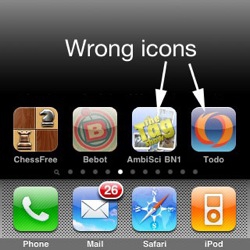
Mixed Up iPhone Icons With 3.0

Posted by Jeff Campbell in "Apple Software (iPhone/iPod Touch)" @ 10:00 AM

http://www.tuaw.com/2009/06/26/ipho...in-version-3-0/

"But not the right place, and that's the problem. Apple support boards are seeing increasing message traffic about icons that vanish, or attach themselves to the wrong app. This seems a problem with iPhone 3.0. Older versions seem unaffected."

This hasn't happened to me yet, but some are experienced some messed up icons. There are also icons that are turning white, some that aren't showing up at all and some that are in the wrong positions. One developer said it was seen in the beta version and was pretty common. It isn't happening with everyone and as of yet they haven't described a common denominator. Some of the solutions are to delete the app and re-download it, or sync without the apps then re-sync with them. Anyone out there experiencing this or the one that Vincent described in an earlier post?


Featured Product
News Tip or Feedback?

Contact us

Other Apple Resources

All iOS News

iPhone Life

Thoughts Media Sites

Windows Phone Thoughts

Digital Home Thoughts

Zune Thoughts

Apple Thoughts

Android Thoughts

Reviews & Articles

Loading feed...

News

Loading feed...

Reviews & Articles

Loading feed...

News

Loading feed...

Reviews & Articles

Loading feed...

News

Loading feed...

Reviews & Articles

Loading feed...

News

Loading feed...

Reviews & Articles

Loading feed...

News

Loading feed...

Sponsored links